Describe the job in plain language. The agents set up the model, run sweeps and optimizations, check the results against your spec, and report back — unattended, on top of the HFSS install you already have.
Built by PhDs in electromagnetics and applied mathematics.
14 days free · then $400/month · cancel anytime · not charged until your trial ends
Watch It Prepare a Real Model
The agent works directly inside your HFSS session — it reads the model you have open, tells you what needs fixing, and asks only the questions that matter.

A drone assembly imported into Ansys HFSS, with the agent alongside it. Before anything solves, it scans the geometry and flags what would block the run: 30 solids with no material assigned, and micron-scale sliver edges that would wreck the mesh.
From a production deployment with Millibeam, built on these agents. Read the impact study →
What the Agents Do
Intelligent CAD-to-Simulation
Imports, defeatures, and prepares your CAD geometry for the solver — removing irrelevant features and generating simulation-ready mesh settings without expert tuning.
Autonomous Simulation Management
Launches solves, sweeps, and optimization loops; watches convergence; and adjusts settings from the solver’s own diagnostics instead of waiting on an engineer.
Post-Processing & Scenario Exploration
Extracts S-parameters, field data, and performance metrics in minutes, and compares design variations from a natural-language request.
See It in Action
Real runs against live HFSS projects.
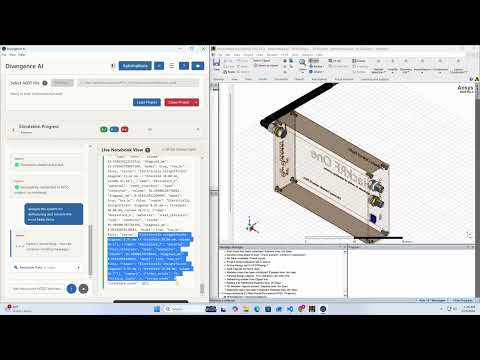
Minimize Manual CAD Work
Create simulation-ready geometry in seconds with natural language — automated defeaturing strips unnecessary CAD detail so models solve without manual cleanup.
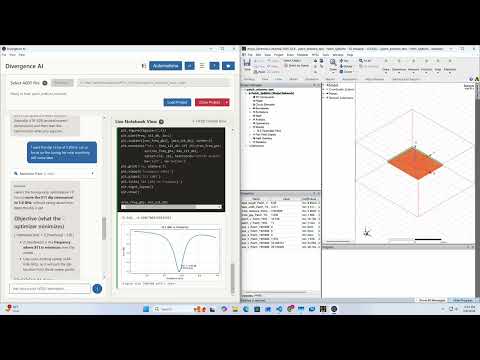
Run Sweeps and Optimizations Without Senior Oversight
Launch parameter sweeps and optimization workflows from a plain-language request, or connect your own optimizer. The agent orchestrates the loop, catches errors early, and queues follow-up runs.
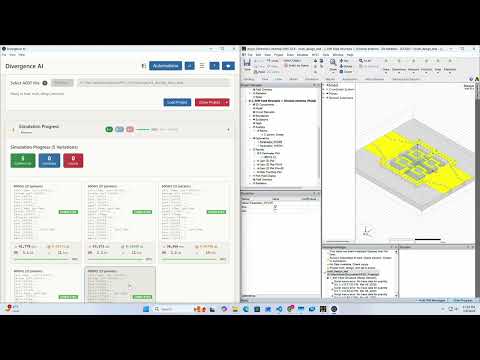
Get Actionable Insights in Minutes, Not Days
S-parameter plots, Smith charts, and far-field patterns on demand — from simulation complete to design decision without a post-processing queue.

Up and Running in Three Steps
No migration project and no integration work — the agents drive the HFSS install and license you already have.
Start your free trial
Create an account and start a 14-day trial with full access. A card is taken at checkout, but you are not charged until the trial ends.
Download and install
Download the Windows installer as soon as checkout completes and run it. Requires Ansys HFSS 2021.1 or later, installed and licensed.
Open an HFSS project
Launch the app, point it at your HFSS version, open a project, and describe what you want done.
Every Run Makes the Next One Better
Simulation has what most AI domains lack: an objective referee. A solve converges or it doesn’t; a design meets the spec or it misses. So the agents grade their own work against the numbers your engineers would check — and improve on it, with no review queue in the way.
A request goes in. Setup, sweep, optimization, verification, and the report come out — with nobody watching the solver.
The solver is the referee. Convergence, S-parameters, gain, efficiency, margin against spec — numbers the agent reads for itself.
What worked feeds back in — better starting points, tighter bounds, fewer wasted solves. The tenth run on your parts is not the first run over again.
Every solve, variable change, and decision is logged with the project, so any run can be replayed and reviewed after the fact.
The Problem, in Engineers’ Own Words
From 80+ interviews with RF and simulation engineers across aerospace, telecom, semiconductors, and medical devices.
“I spent 3 hours manually fixing an asymmetric mesh — then gave up for the day.”
RF engineer, medical-device startup
“Waiting 10 hours and then nothing. That’s an entire day lost.”
Antenna engineer, wireless hardware company
“A lot of the RF experts are baby boomers — we are going to lose a lot of these people.”
Engineering leader, aerospace & defense
Built for Engineering Teams
Solver-Native Integration
Uses official vendor APIs and your existing licensing — Ansys HFSS today, Dassault CST next — with no hacks or reverse engineering.
Maintained Against Every Release
We track solver version drift and PyAEDT integration quirks so your automation keeps working release after release.
Your Projects Stay Yours
The agents drive HFSS on your workstation and your project files stay there. Enterprise plans add private or fully on-premises deployment.
Built by RF Engineers, for RF Engineers
Founded by PhDs in electromagnetics and applied mathematics, and developed with RF engineers across aerospace, telecom, and advanced hardware. Meet the team →
Simple Pricing
One plan with every agent. Start free for 14 days; switch or cancel anytime from your account.
Pro
per month
- 14-day free trial with full access
- All simulation agents (Ansys HFSS today; CST coming soon)
- Setup, sweeps, and optimization from plain-language requests
- Automated post-processing — plots, reports, beam steering, sidelobe control
- Unlimited projects & saved configurations
- Email support & setup tutorials
Enterprise
for teams
- Everything in Pro, for your whole team
- Private or fully on-premises deployment, with local LLM inference
- Custom workflows and integration with your solvers, CAD/PLM, and pipelines
- Onboarding and enablement for your engineers
- Priority support and roadmap input
Frequently Asked Questions
What do I need to run it?
A Windows 10 or 11 PC with Ansys HFSS 2021.1 or later, installed and licensed. Divergent Physics installs alongside it — there is nothing to migrate.
How does the free trial work?
You get 14 days of full access. A card is taken at checkout but nothing is charged until the trial ends, and you can cancel before then from your account.
How much does it cost after the trial?
$400 per month, or $4,000 per year — two months free. Teams that need private deployment or custom workflows can talk to us about Enterprise.
Does my design data leave my machine?
The agents drive HFSS locally, and your project files stay on your workstation. Requests are sent to the AI model provider configured in the app’s settings. Enterprise plans can run fully on-premises, including local model inference.
Does it support CST or other solvers?
Ansys HFSS is supported today. Dassault CST support is coming soon.
Can you build a workflow for us?
Yes — for teams that want a workflow encoded and maintained for them, our engineers do that as part of Enterprise. See Services for how it works.
Run Your Next HFSS Study With an Agent
Start free on your own projects, inside your existing Ansys setup.
14-day free trial
Not charged until your trial ends
Cancel anytime
Book a demo
Pick a time for a 30-minute walkthrough on a project like yours — or tell us what you simulate below and we'll reply within 24 hours.